
Why Businesses Should Hire Power BI Developers for Smarter Data Decisions
-
Written by

-
Post DateJuly 8, 2026
Why Businesses Should Hire Power BI Developers for Smarter Data Decisions
Businesses collect data every day from CRMs, sales systems, marketing tools, finance software, customer support platforms, inventory systems, and spreadsheets. But collecting data is not enough. The real value comes when that data is cleaned, connected, visualized, and converted into insights that help teams make faster decisions.
This is where Power BI becomes powerful.
Microsoft Power BI helps businesses connect data, create interactive dashboards, build reports, and share insights across teams. But to get the best results, businesses often need more than just the tool. They need skilled Power BI developers who understand data modeling, DAX, dashboard design, automation, security, and business reporting.
That is why many companies choose to Hire Power BI Developers who can turn raw business data into meaningful dashboards and real-time analytics.
What Does a Power BI Developer Do?
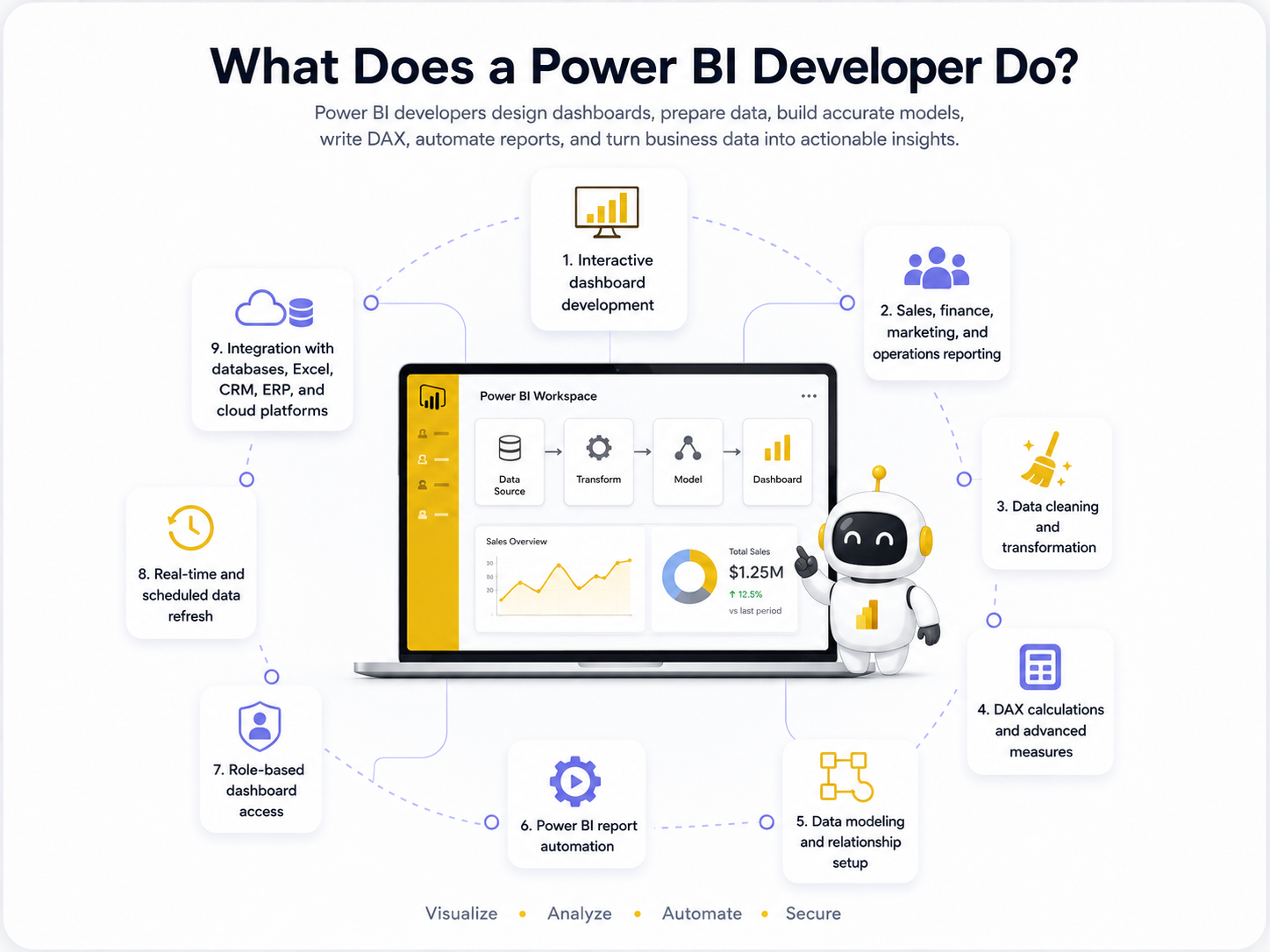
A Power BI developer helps businesses design, build, and manage business intelligence dashboards. Their work goes beyond creating charts. A good Power BI developer understands business goals, prepares data, builds accurate models, writes DAX calculations, improves dashboard performance, and creates reports that teams can actually use
A Power BI developer can help with:
- Interactive dashboard development
- Data cleaning and transformation
- DAX calculations and advanced measures
- Data modeling and relationship setup
- Power BI report automation
- Real-time and scheduled data refresh
Why Businesses Need Power BI Developers
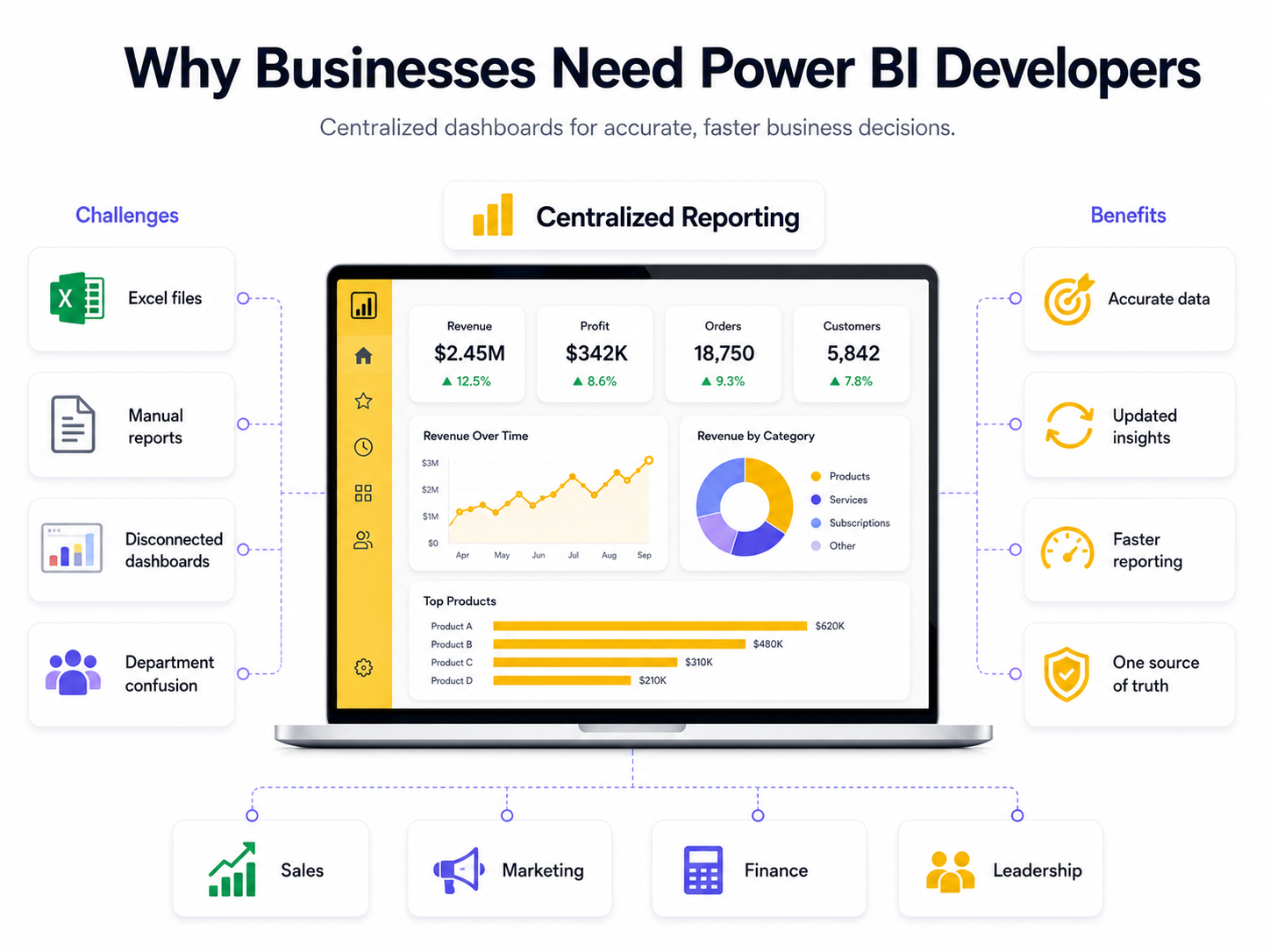
Many companies still depend on Excel files, manual reports, and disconnected dashboards. This often creates problems such as duplicate data, outdated numbers, slow reporting, and confusion between departments.
A professional Power BI developer solves these problems by building a centralized reporting system where every team can access accurate and updated insights.
For example, instead of manually preparing weekly sales reports, a business can use Power BI dashboards that update automatically. Sales teams can track revenue, marketing teams can monitor campaign performance, finance teams can review expenses, and leadership can see company-wide KPIs in one place.
If your business wants deeper analytics, DatumQuest also provides Data Analytics Solutions to help convert raw data into actionable insights.
Key Benefits of Hiring Power BI Developers
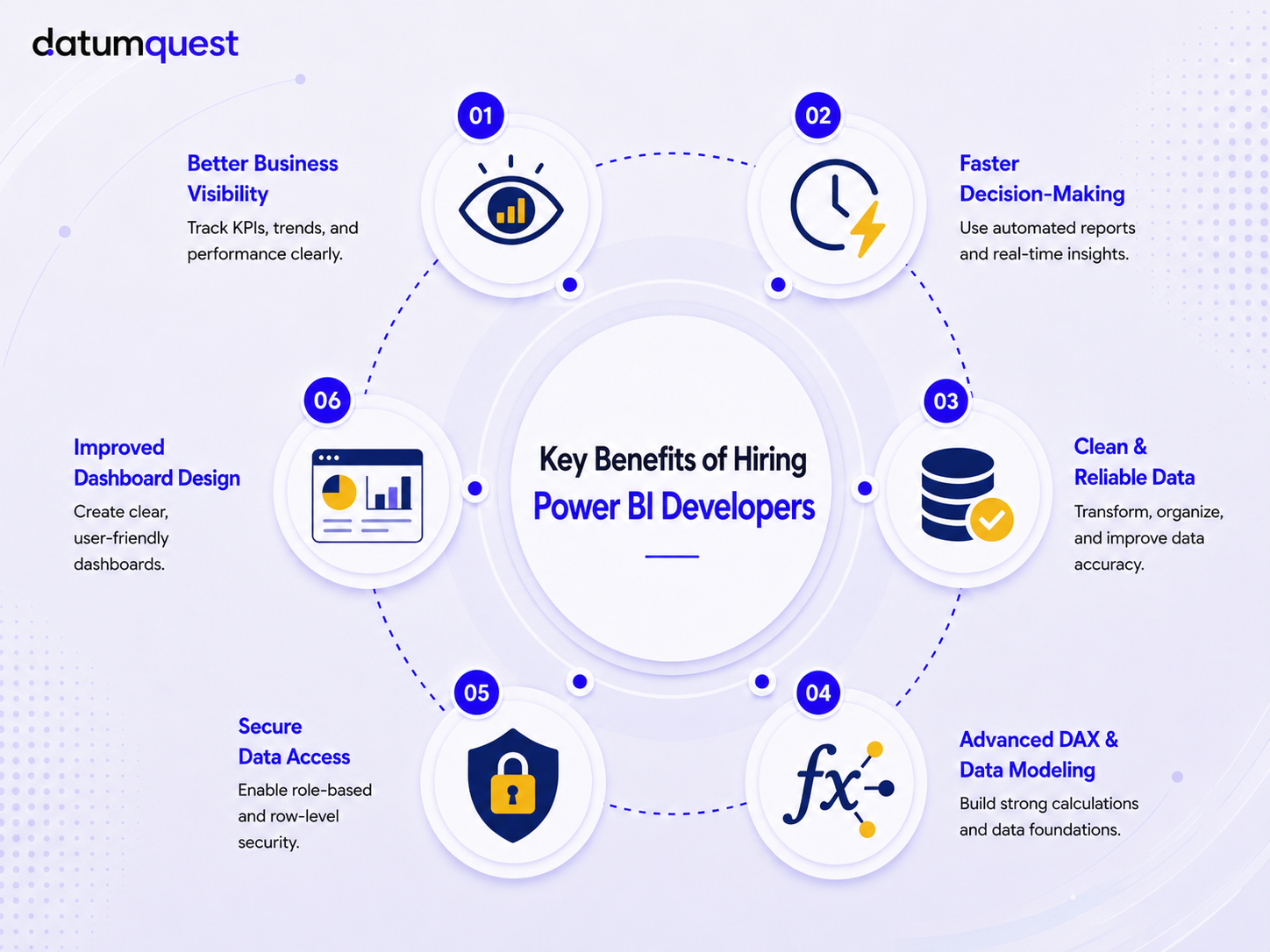
1. Better Business Visibility
Many businesses collect data from different tools, but they do not have one clear view of their performance. Sales, finance, marketing, and operations teams may all use different reports, which can create confusion.
Power BI developers build dashboards that show important business metrics in one place. This helps teams track KPIs, compare performance, identify trends, and understand what is happening across the business.
For example:
- Track monthly revenue
- Monitor sales performance
- Compare team or department results
- Identify business trends
- View KPIs in one dashboard
2. Faster Decision-Making
When reports are created manually, decisions often get delayed. Teams may wait for updated spreadsheets or weekly reports before taking action.
Power BI developers can automate reporting so dashboards update automatically. This helps business owners, managers, and teams make faster decisions using fresh and accurate data.
For example:
- Automated sales reports
- Real-time dashboard updates
- Faster monthly reporting
- Quick performance comparison
- Instant access to business insights
3. Clean and Reliable Data
Dashboards are only useful when the data is correct. Many businesses face problems like duplicate records, missing values, wrong formats, and scattered data sources.
Power BI developers clean, transform, and organize data before creating dashboards. They connect multiple data sources and prepare reliable data models so reports show accurate information.
For example:
- Clean messy Excel data
- Remove duplicate records
- Connect multiple data sources
- Create accurate data models
- Improve report accuracy
4. Advanced DAX and Data Modeling
Basic charts are easy to create, but advanced business reporting needs proper calculations and strong data modeling. Power BI developers use DAX to create custom measures and advanced business logic.
This helps businesses track metrics like revenue growth, profit margin, customer retention, year-over-year comparison, and monthly performance trends.
For example:
- Revenue growth calculations
- Profit margin analysis
- Monthly trend reports
- Year-over-year comparison
- Custom business KPIs
5. Secure Data Access
Not every team member should see all company data. For example, a sales manager may only need regional sales data, while leadership may need company-wide reports.
Power BI developers can set up role-based access and row-level security. This ensures users only see the data that is relevant to their role.
For example, businesses can use AI with n8n to:
- Role-based dashboard access
- Row-level security
- Department-wise reporting
- Secure executive dashboards
- Controlled data sharing
6. Improved Dashboard Design
A dashboard should not only look good, it should also be easy to understand. Poor dashboard design can confuse users and make insights difficult to find.
Power BI developers create clean, user-friendly dashboards with proper charts, filters, layouts, and visual hierarchy. This helps users quickly understand business performance without wasting time.
For example, businesses can use AI with n8n to:
- Clean dashboard layout
- Easy-to-read charts
- Useful filters and slicers
- Better visual hierarchy
- User-friendly reporting experience
Common n8n Automation Use Cases
Power BI can be used across many industries, especially where businesses depend on data for daily decisions.
- Tracking patient records and appointments
- Monitoring hospital performance
- Analyzing treatment and service quality
- Managing staff and operational reports
Power BI helps healthcare teams improve reporting, reduce manual work, and make data-driven decisions.
- Tracking revenue and expenses
- Monitoring profit and loss reports
- Analyzing cash flow and budgets
- Creating financial forecasting dashboards
Power BI helps finance teams view accurate numbers, reduce reporting errors, and understand business performance clearly.
- Tracking product sales and inventory
- Monitoring customer behavior
- Analyzing order and delivery performance
- Comparing marketing campaign results
Power BI helps retail and e-commerce businesses understand what is selling, what needs improvement, and where revenue is growing.
- Monitoring production performance
- Tracking machine downtime
- Analyzing quality control data
- Managing supply chain and inventory reports
Power BI helps manufacturing companies improve efficiency, reduce delays, and track operations in real time.
- Tracking shipments and delivery status
- Monitoring warehouse performance
- Analyzing transportation costs
- Improving supply chain visibility
Power BI helps logistics teams manage operations better, reduce delays, and improve delivery performance.
When Should You Hire a Power BI Developer?
You should consider hiring a Power BI developer if:
- Your team still creates reports manually
- Your business data is scattered across multiple tools
- You cannot trust your current dashboard numbers
- Your reports are slow or difficult to understand
- You need real-time or automated reporting
- You want custom dashboards for different departments
- You need advanced DAX calculations
- You want secure dashboards with role-based access
- You want to move from Excel reports to Power BI
If any of these problems sound familiar, hiring Power BI developers can help your business save time and make better decisions with data.
Power BI Developer vs Basic Dashboard Creator
A basic dashboard creator may know how to build charts. But a professional Power BI developer understands the full reporting lifecycle.
They know how to connect data sources, clean data, create data models, write DAX, optimize performance, apply security, automate refresh, and design dashboards that support business goals.
This difference matters because a dashboard is not just a visual report. It becomes a decision-making system for your company.
Why Hire Power BI Developers from DatumQuest?
DatumQuest helps businesses build powerful business intelligence solutions using Power BI, DAX, data modeling, and automated reporting systems. Our developers understand business goals and create dashboards that are accurate, scalable, secure, and easy to use.
By hiring Power BI developers from DatumQuest, businesses can get:
- Custom Power BI dashboard development
- Data modeling and DAX measure creation
- Integration with Excel, CRM, ERP, and databases
- Automated reports and real-time dashboard updates
- Secure and role-based dashboard access
- Performance optimization and report improvement
- Long-term support and maintenance
- Flexible hiring models
DatumQuest offers flexible pricing options, including hourly and dedicated hiring models for Power BI development. You can offer plans such as $18/hr and $2400/mo dedicated based on your service model.
Final Thoughts
Power BI is one of the most effective tools for turning business data into clear, useful insights. But to get real value from it, businesses need dashboards that are accurate, fast, secure, and easy to understand.
Hiring Power BI developers helps companies move away from manual reporting and build smarter analytics systems. With the right Power BI experts, your team can track performance, discover trends, reduce reporting time, and make confident data-driven decisions.
If your business is ready to improve reporting and analytics, you can Hire Power BI developers from DatumQuest and start building dashboards that support real business growth.
Ready to Build Smarter Power BI Dashboards?
Turn your business data into clear dashboards, automated reports, and actionable insights with DatumQuest’s Power BI developers.